VoiceInbox · Project snapshot
Transcription that never leaves the machine.
A desktop app that transcribes WhatsApp voice notes entirely on the machine they are on. No audio leaves the device.
This is a smaller build than the case studies on this site, and it is my own. It was a short page for months, because most of what it could have said had never been written down anywhere. That changed on 2026-08-17 and the page grew accordingly. Where it is still silent, it is silent because a sentence would have to be invented to fill the gap.
The problem
A voice note is the least searchable thing anybody sends you.
The ordinary fix is to send the audio to a transcription service. That is fine until the audio is somebody else’s voice saying something they said to you privately, at which point the ordinary fix has quietly become a decision you made on their behalf.
What it does
Three properties, and each one is a constraint rather than a feature.
- 01 MLX Whisper runs locally. No audio leaves the device BUILT
- 02 The one API key it holds lives in the system keychain, not a config file BUILT
- 03 The window runs under a content-security policy that blocks everything it does not need BUILT
The third one is the habit rather than the product. A desktop shell is a browser with the safety rails taken off, and a policy that denies by default is the difference between an app and an app that is also an attack surface.
What you get out of it
A transcript is not the useful part.
A wall of text is a nine-minute voice note with the nine minutes still in it. So two things sit on top of the transcription, and they are the reason the thing gets opened rather than admired.
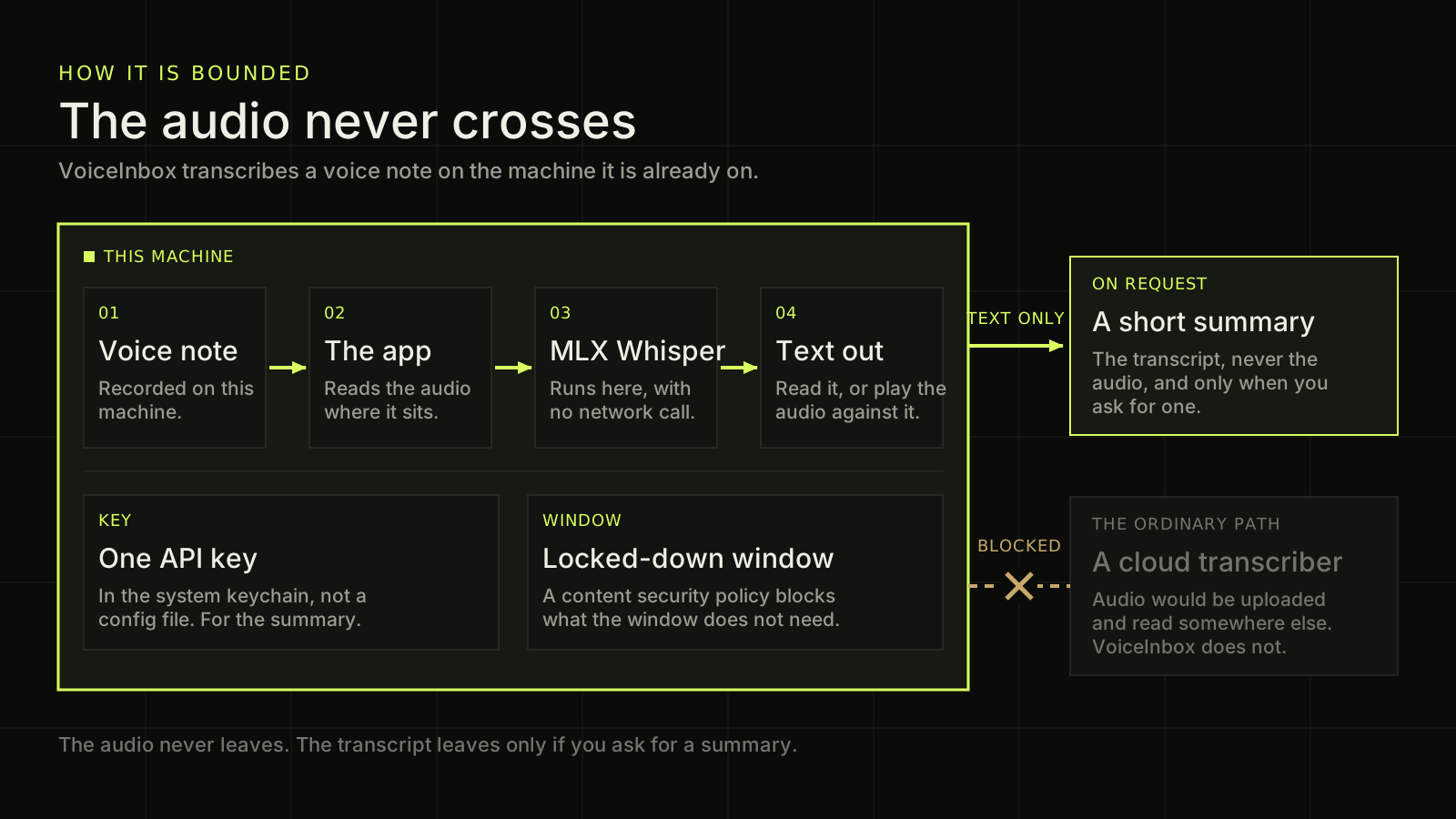
A short summary. The high-level version of what was said, so you can decide in five seconds whether the rest is worth reading. This is the one step that leaves the machine, and the section below says exactly how.
A player that reads along with you. The original audio or video plays with the transcript highlighted in step, karaoke fashion. Click anywhere in the text and the audio jumps there. Click anywhere on the timeline and the text follows. That is the feature that turns a transcript from a file you saved into a recording you can actually navigate.
Open the diagram description
A diagram about where VoiceInbox does its work, and about the one thing that is allowed to leave. A large panel outlined in bright green fills the left two thirds of the picture and is labelled THIS MACHINE. Inside it, four numbered boxes read from left to right, joined by green arrows. Step one, a voice note, recorded on this machine. Step two, the app, which reads the audio where it sits. Step three, MLX Whisper, which runs here with no network call. Step four, text out, which can be read or played back against the original audio. Below those four, still inside the same boundary, two smaller boxes state two further facts. The first says one application programming interface key, held in the system keychain rather than in a configuration file, and that it is for the summary rather than for the transcription. The second says a locked down window, where a content security policy blocks what the window does not need. Two paths leave the boundary on the right and they are deliberately different. The upper path is allowed: a green arrow labelled TEXT ONLY, ON REQUEST leads to a box headed a short summary, which explains that the transcript and never the audio is sent out, and only when somebody asks for one. The lower path is refused: a broken warm brown line with a large cross drawn over it and the word BLOCKED above it leads towards a dimmed box headed a cloud transcriber, which explains that the ordinary approach would upload the audio to be read somewhere else, and that VoiceInbox does not do this. A line at the bottom reads: the audio never leaves. The transcript leaves only if you ask for a summary.
Drawn from this page’s own copy.
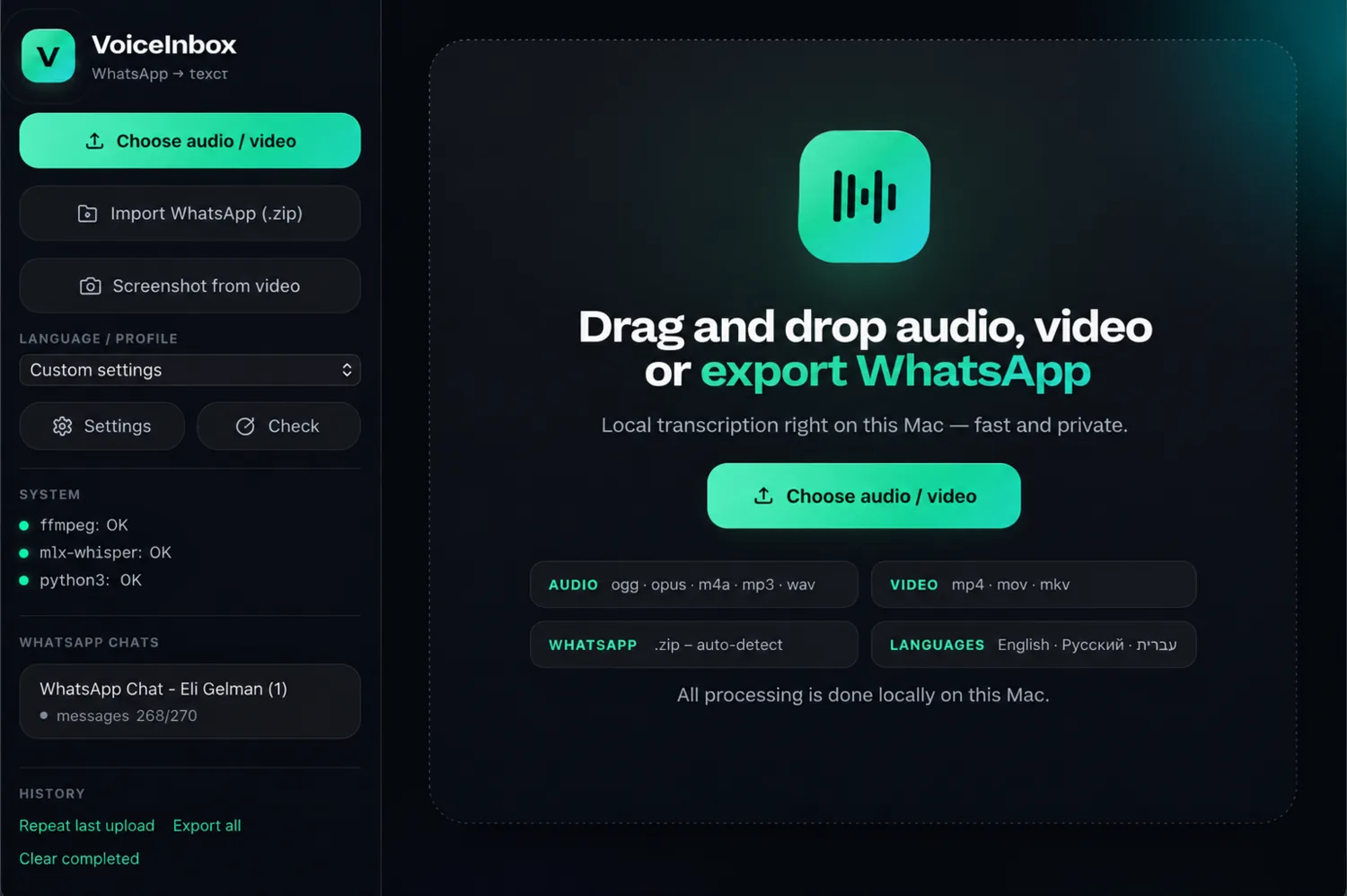
Prepared for publication with invented content. The name in the chat list is not a real person and no transcript is on screen: the material this was built against is somebody’s private correspondence, and none of it appears here in any form.
The part that does leave
The audio never goes. The summary is a different question.
Transcription is local and that is the whole point: MLX Whisper runs on the machine and no audio is uploaded anywhere, ever. Saying only that would be the convenient version, so here is the rest of it.
The summary is made by a model reached over a network, which is what the single API key in the keychain is for. So the transcript can leave, when you ask for a summary, and the audio cannot leave at all. Those are two different sentences and a page about privacy has no business blurring them.
The distinction is not a technicality either. Text you have already read is a smaller thing to hand over than somebody’s voice saying it, you can see exactly what is being sent because it is on your screen, and the step is one you choose rather than one that happens because you opened the app.
The hard part
Not the boundary, which is a design decision you make once. The hard part was making it accurate and fast at the same time, on a laptop, with no cluster behind it. Transcription quality and transcription speed pull in opposite directions, and a local tool that is accurate and takes twenty minutes gets used exactly once.
Who uses it
Me, and my friends. That is the complete and honest market for it.
It gets opened for two things. Long WhatsApp voice notes, where somebody has sent four minutes of speech and the polite response is to listen and the practical one is to read the summary. And recordings of video calls, where a transcript makes the meeting searchable afterwards, and readable by somebody who would rather not have attended it in a second language.
There are no sample transcripts and there will not be. The material this was built against is somebody’s private correspondence, so a synthetic demonstration is the only kind that could ever appear here, and the screenshot above is exactly that: the real interface, prepared with invented content, with nothing on screen that belongs to anyone.
Related service: AI Systems & Agents
Where the data cannot go
Is the data the reason you have not automated it?
Tell me what the material is and where it is not allowed to go. There is usually a version of the system that runs inside that boundary.
Ask Dan on WhatsApp (opens in a new tab)or email dan@burdetsky.xyz