Client onboarding · Case study
Client onboarding and document automation.
A professional services firm was onboarding clients by hand across five tools. It now runs as one tracked process, and it started with the history rather than beside it.
Context
The work was not hard. It was spread out.
A professional services firm ran a separate inbox, a separate board and a Slack thread across every service line, and somebody had to remember what happened next. Onboarding worked because specific people held it in their heads.
Every new client was opened by hand. Someone took the intake details, sorted the documents that arrived, updated the tasks and remembered to tell the customer where things stood. The work was not hard; it was spread across Slack, email, WhatsApp, Google Drive, Trello and a spreadsheet, and moving information between them was the job.
The problem underneath
Two channels, one document, no shared memory.
The same document could arrive by email and by WhatsApp, and nothing anywhere knew that. The clearest instance of it: the same WhatsApp document arrived twice, two seconds apart, and got processed twice.
That is the whole shape of the problem. Not a hard task done badly, but a set of easy tasks with no shared record of which of them had already happened.
My role
Discovery through handover.
I mapped the process with the people running it, designed the system, built every workflow and the custom logic around it, migrated the history into it, and wrote the documentation the team runs it from. There was no other engineer on it.
Open the architecture description
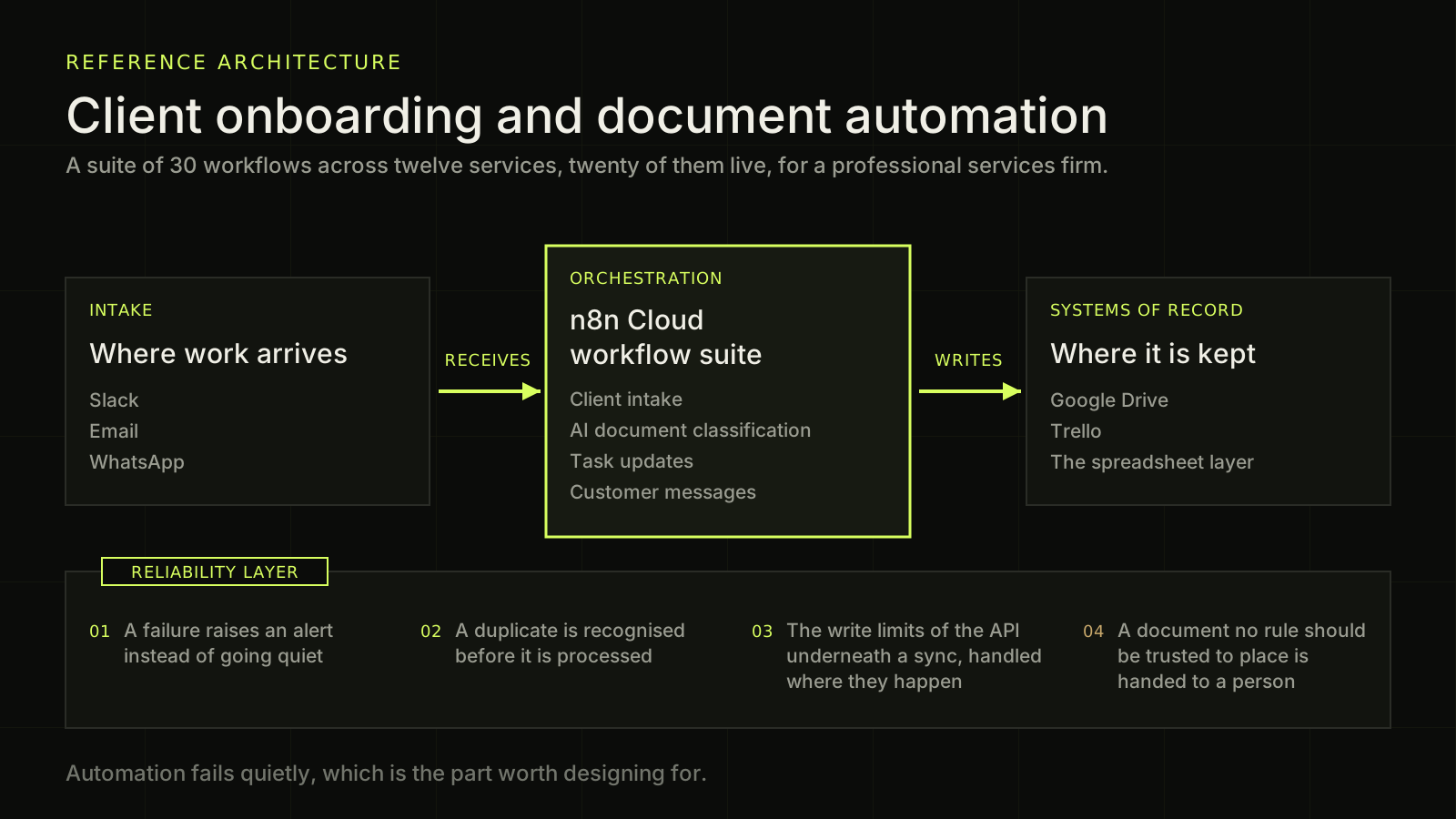
A dark diagram on a faint grid, drawn in acid green on near black. The heading at the top left reads: Client onboarding and document automation, under a small green label reading reference architecture, and above a line reading: a suite of 30 workflows across twelve services, twenty of them live, for a professional services firm. Below the heading three boxes read left to right and describe one path. The first box is labelled intake and titled Where work arrives, and it lists Slack, Email and WhatsApp. A green arrow labelled receives points right out of it into the second box. The second box is the emphasised one, outlined in green: it is labelled orchestration and titled n8n Cloud workflow suite, and it lists client intake, AI document classification, task updates and customer messages. A second green arrow labelled writes points right out of it into the third box, which is labelled systems of record, titled Where it is kept, and lists Google Drive, Trello and the spreadsheet layer. Beneath the three boxes a wide panel holds the reliability layer, named on a small tab cut into its top edge. The panel carries four numbered behaviours the suite is built for. Item zero one: a failure raises an alert instead of going quiet. Item zero two: a duplicate is recognised before it is processed. Item zero three: the write limits of the API underneath a sync are handled where they happen. Item zero four, numbered in warm gold because it ends with a human rather than a rule: a document no rule should be trusted to place is handed to a person. The closing line reads: automation fails quietly, which is the part worth designing for.
Diagram drawn for publication from this case’s own copy. No client system, screen or document is shown.
The approach
One path first, then everything that had been waiting behind it.
A sales rep adds a client from Slack. Documents arrive by email or WhatsApp, get classified, and land in the right Google Drive folder, Trello card and checklist. When a sale closes, the customer is notified and the internal tracking updates.
The onboarding path was built first and on its own. The rest arrived because once one process is tracked, the next one being untracked starts to show: trackers kept in step with the calendar, performance and finance figures carried automatically, a support desk over WhatsApp with a daily summary of how long people waited for an answer.
The last group exists only to notice when something has stopped. It is the one I would build first if I were starting again.
Hard constraints
The three things that could not be traded away.
- 01 No client is identifiable from anything published about this system ABSOLUTE
- 02 Nothing is filed under a client’s name on a model’s say-so ABSOLUTE
- 03 Every account and credential belongs to the client, not to me ABSOLUTE
The third one is why the system authenticates with per-service accounts instead of shared credentials. A shared login is convenient until the person it belongs to leaves.
Reliability and controls
Automation fails quietly. That is the part worth designing for.
A workflow can stop without anyone noticing. The same document can arrive twice, once by email and once by WhatsApp. A sync can run into the write limits of the API underneath it. A document can arrive that no rule and no classifier should be trusted to place. Each of those is handled where it happens rather than discovered later by whoever was waiting for the result.
A Files Registry prevents the same document being processed twice across channels. Writes to the spreadsheet layer are throttled under the API quota, which ended the sync failures that had been losing records earlier in the year.
The reliability layer is not one setting. It is five workflows that run whether or not anyone is watching.
- 01 Shared error handler, circuit breaker, direct alert BUILT
- 02 Health monitor, every 10 minutes BUILT
- 03 Silence detector, reports what did not happen BUILT
- 04 Nightly tracker backups BUILT
- 05 Daily response-time summary BUILT
Where the model decides, and where it does not
Four nodes, and one of them only says no.
There are four AI steps and they do two different jobs. Two read documents: an image or a PDF arrives and the model says what it is. One turns a sentence a person typed in Slack into structured JSON, so a person can write a sentence instead of filling a form.
The fourth is the interesting one. It is a validator: it takes what the person wrote and what they actually attached, and reports where the two disagree. It does not file anything. Nothing downstream trusts it to be right, only to be worth checking.
It is allowed to read, to suggest and to disagree. What it is not allowed to do is be the last step before something is filed under a client’s name.
Unclear cases go to a person.
What changed
The history moved with it, rather than staying beside it.
Before: a separate inbox, a separate board and a Slack thread across every service line, and somebody had to remember what happened next. Onboarding worked because specific people held it in their heads.
After: the same work runs through one tracked process across every service line. A document arriving by email or by WhatsApp is deduplicated against a shared registry, classified, filed and attached to the right client record. Unclear cases still go to a person, deliberately.
- The historical documents were backfilled out of the old inboxes into the correct client records, so the new process started with the history rather than beside it, and the existing board cards were given an owner.
- The booking and consultant trackers sync on a schedule instead of being cross-referenced by hand.
- All three live trackers are copied to a separate folder every night.
- Writes to the spreadsheet layer are throttled under the API quota, which ended the sync failures that had been losing records earlier in the year.
The part that matters is not that it runs. It is that when it does not run, one error handler catches it, one alert reaches one person, and the work in flight is preserved rather than lost.
Response time
Ten hours to nine minutes, and nothing here answers for anybody.
The support line runs over WhatsApp. On 2 August it was mirrored into Slack: one thread per customer, the reply goes straight back out from Slack, and every morning the system publishes how long people waited the day before.
The system does not answer anyone. It makes the queue visible, puts the reply one keystroke away, and publishes the number every morning. That is the whole mechanism, and it is worth saying plainly rather than implying that a bot got faster.
Two weeks later the median first reply had gone from ten hours to nine minutes, and the number of customers left waiting more than an hour was zero. The figures are read off the summary tab the system writes for itself, on a rolling seven-day window.
The count of conversations over an hour went up before it went down, from nine to twenty-nine in the first week. That is what making a queue visible does: it finds the queue before it drains it. A version of this page that quietly skipped that row would be describing a different system.
- 01 4 August, two days in. Nine conversations sitting over an hour 10 HRS
- 02 8 August. Twenty-nine over an hour: the backlog became visible 43 MIN
- 03 13 August. Ten over an hour 17 MIN
- 04 18 August. None over an hour 9 MIN 22 SEC
What it has filed
One registry, two channels, and no second copy of anything.
The same document could arrive by email and by WhatsApp, and nothing anywhere knew that. One shared registry across both channels is what stops the second copy being handled as though it were the first.
- 01 Documents in the cross-channel registry: 2,162 by email, 255 by WhatsApp 2,417
- 02 Client folders created and filed in Drive 244
- 03 Client records in the single source of truth 189
- 04 Leads carried end to end 764
- 05 Meetings tracked with attendance, no-shows and lead time, 40 fields each 1,104
- 06 Customer conversations mirrored as Slack threads 160
Counts only. Nothing about who any of them are, or what any of them are for, is published anywhere on this site.
Result
“One tracked process, across every service line.”
Manual intake, document routing and customer updates moved into one tracked process across every service line.
Implementation detail
How much of it there is, for anyone who wants the number.
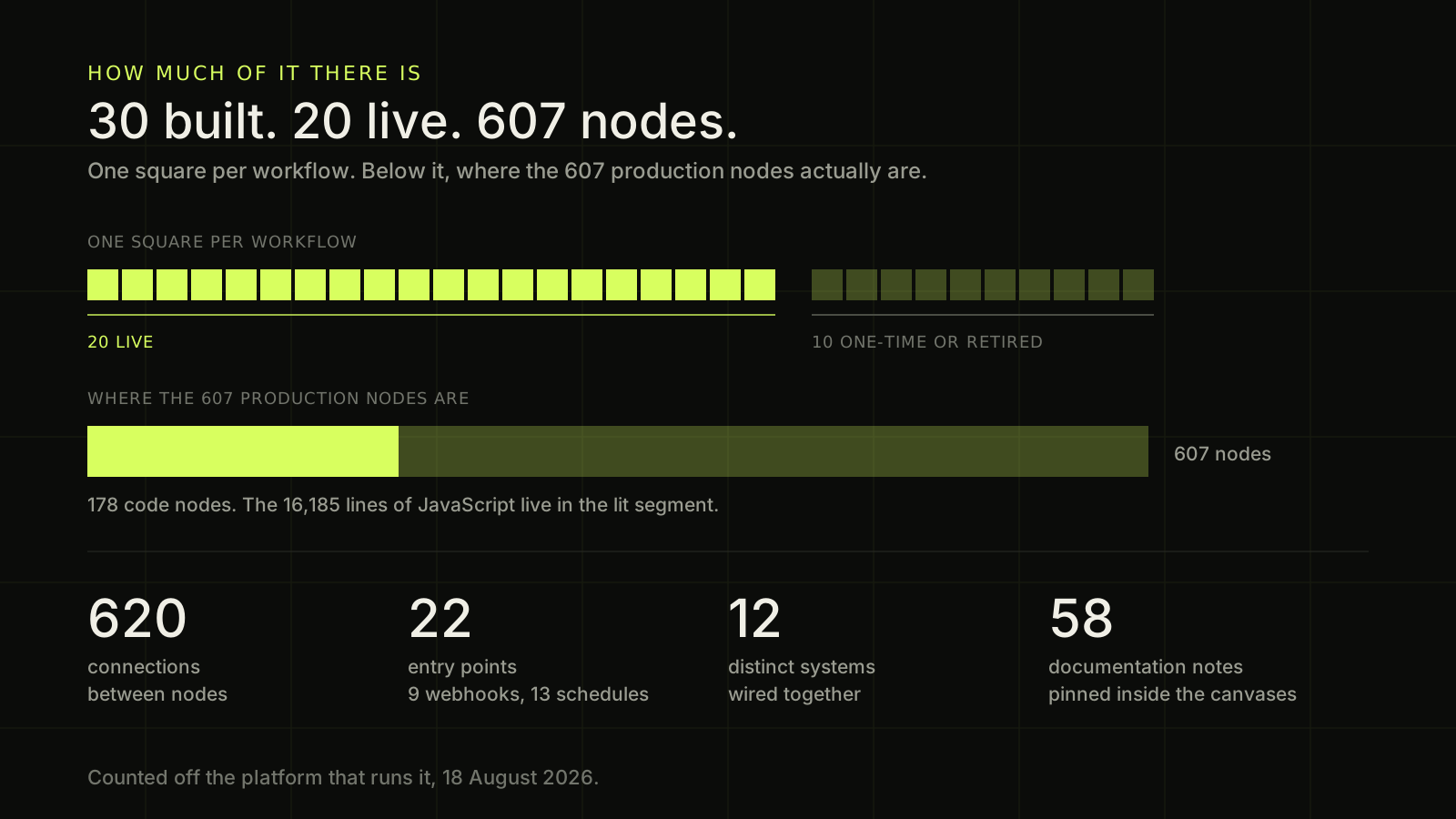
Thirty workflows built, twenty of them live, 607 nodes and 16,185 lines of JavaScript between them. Counted off the platform that runs it rather than off a document about it.
- 01 Workflows built. Twenty are live; ten are one-time or retired 30
- 02 Nodes in production, with 620 connections between them 607
- 03 Code nodes, holding 16,185 lines of JavaScript 178
- 04 Entry points: nine webhooks and thirteen schedules 22
- 05 Distinct systems wired together 12
- 01 Executions the platform is holding, 9 to 18 August 25,007
- 02 Of those, the number that failed 01
- 03 Runs on an average full day 2,835
- 04 Runs on the busiest day, 13 August 3,206
- 05 Runs on the single busiest workflow 6,438
Open the diagram description
A diagram of how much of this system there is, drawn entirely from figures published on the page it sits on. Across the upper half, thirty small squares stand in a single row, one square per workflow that has been built. The first twenty are lit in acid green and labelled live; the last ten are dim and labelled one-time or retired, and a rule under the row makes the split explicit. Below the row, a single wide bar stands for the six hundred and seven nodes running in production. It is divided into two segments: the left segment is the one hundred and seventy-eight code nodes and is the lit one, and the right segment is the remaining four hundred and twenty-nine nodes. A line under the bar reads: 16,185 lines of JavaScript live in the lit segment. Beneath that, four figures stand in a row, each a number over a label. Six hundred and twenty, connections between nodes. Twenty-two, entry points, itemised underneath as nine webhooks and thirteen schedules. Twelve, distinct systems wired together. Fifty-eight, documentation notes pinned inside the canvases. A closing line reads: counted off the platform that runs it, on the eighteenth of August twenty twenty-six. No client is named and no client data appears anywhere in this diagram.
Drawn from the figures in the panels above it and from nothing else. No client is named and no client data appears in it.
What went wrong
Three failures, and the check each one left behind.
All three were found in production, in this system, by me. They are here because an automation case study that reports only the happy path is telling you what it does not monitor.
The system reported success while it was throwing client documents away. A size check read the platform's display string, the text "96.4 kB", instead of the byte count. Converting that to a number gives NaN, so the guard failed open and every file whose name had been seen before was counted as a duplicate. Forty customer documents were discarded over five weeks, while every run reported success. Found in a day and fixed the same day; fourteen were recovered out of the platform's own execution history, and the rest were reported as unrecoverable rather than quietly written off. The test that pins it runs the real production code and fails on the old version.
One button press cost five minutes and billed a customer three times. A lookup node sat behind a node emitting a 133-row registry, so a single reaction fired 133 full-table reads and exhausted the read quota on the API underneath. The latency that caused then defeated the workflow's own already-sent guard, and a customer received the same paid message three times. One flag fixed it, and the pattern it belongs to is a written rule now rather than something I remember.
A green test that could not fail. A guard stopping one supplier from claiming another's package was tested against a string that did not contain the words being matched. The test passed by construction, and the bug shipped underneath it. The rule since: a negative test case comes out of production data, never out of imagination.
A test that has never been watched failing is not evidence that the thing it guards works. It is evidence that the test ran.
- 01 Assertions in the tests guarding this logic 1,268
- 02 Test files 47
- 03 Issues tracked with a root cause and a fix 234
- 04 Architecture decision records written 133
- 05 Commits 593
- 06 Handover documents, plus a 30-page PDF rebuilt on release 15
Every fix leaves a test behind. 1,268 assertions are the reason the same bug does not come back twice.
Lesson
The part worth copying is not the happy path.
What made this system worth keeping is what happens around it: a failure that raises an alert instead of going quiet, a duplicate that is recognised before it is processed, and a document that goes to a person instead of being guessed at.
Related service: Automation & Integration Engineering
Start with what exists
Have a process spread across too many tools?
Tell me what arrives, what somebody has to do to it by hand, and who finds out when it fails. I will tell you what I would look at first.
Tell Dan about it on WhatsApp (opens in a new tab)or email dan@burdetsky.xyz