SharePoint DMS · Case study
Controlled technical documentation in SharePoint.
A live SharePoint Online reference implementation combining a native controlled document library with a custom guided-search experience, and a native path to the files if the custom layer is ever unavailable.
Context and problem
Structure the documents, without locking the files behind an app.
The team needed a more structured way to classify, control and retrieve technical documents. The obvious solution is a custom application, and the obvious solution has a failure mode: the day the custom layer is unavailable, nobody can reach a document, and the documents were never the thing that broke.
So the constraint came first. Whatever got built could not become the only path to the files.
The architecture
A native library as the source of truth, with a search layer over it.
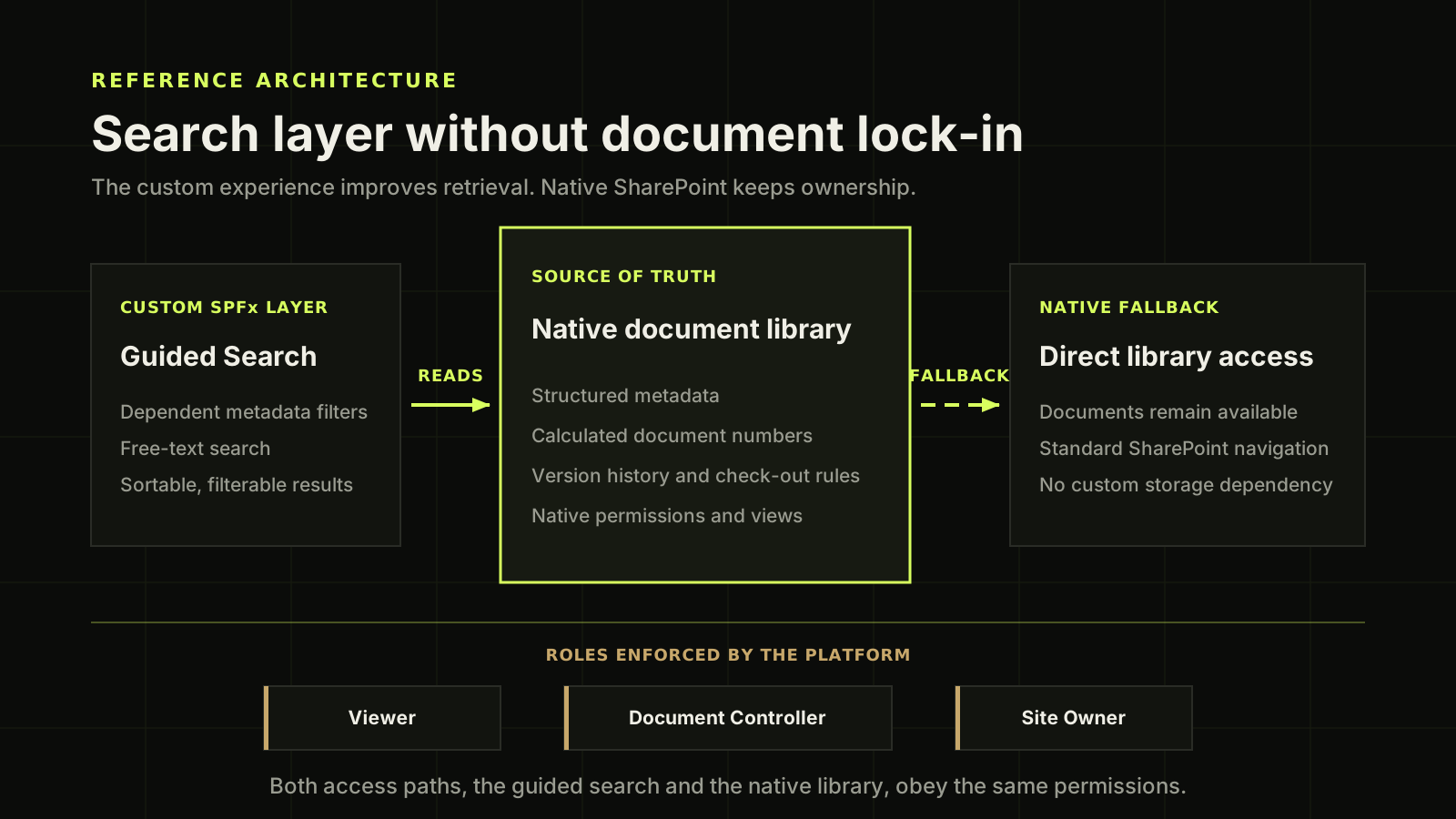
The native SharePoint library remains the source of truth. The custom search layer reads the library but does not own or store the documents.
Open the architecture description
A reference architecture drawn as three panels in a row on a near black background with a faint grid. The panel on the left, labelled as the custom layer and titled Guided Search, lists dependent metadata filters, free-text search, and sortable, filterable results. A solid arrow labelled READS runs from it to the middle panel, which is drawn taller than the other two and outlined in bright green. The middle panel is labelled source of truth and titled Native document library, and it lists structured metadata, calculated document numbers, version history and check-out rules, and native permissions and views. A second arrow, dashed rather than solid and labelled FALLBACK, runs from the middle panel to the panel on the right, which is labelled native fallback and titled Direct library access. That panel says documents remain available, standard SharePoint navigation still works, and nothing depends on custom storage. A horizontal rule crosses the lower part of the picture, and beneath it three tags name the roles Viewer, Document Controller and Site Owner, under a line saying that roles are enforced by the platform. A closing sentence says that both access paths, the guided search and the native library, obey the same permissions. The picture makes one point: the custom layer improves retrieval, and the native library keeps ownership of the documents.
Controlled document flow
Five steps, and a guardrail at each one.
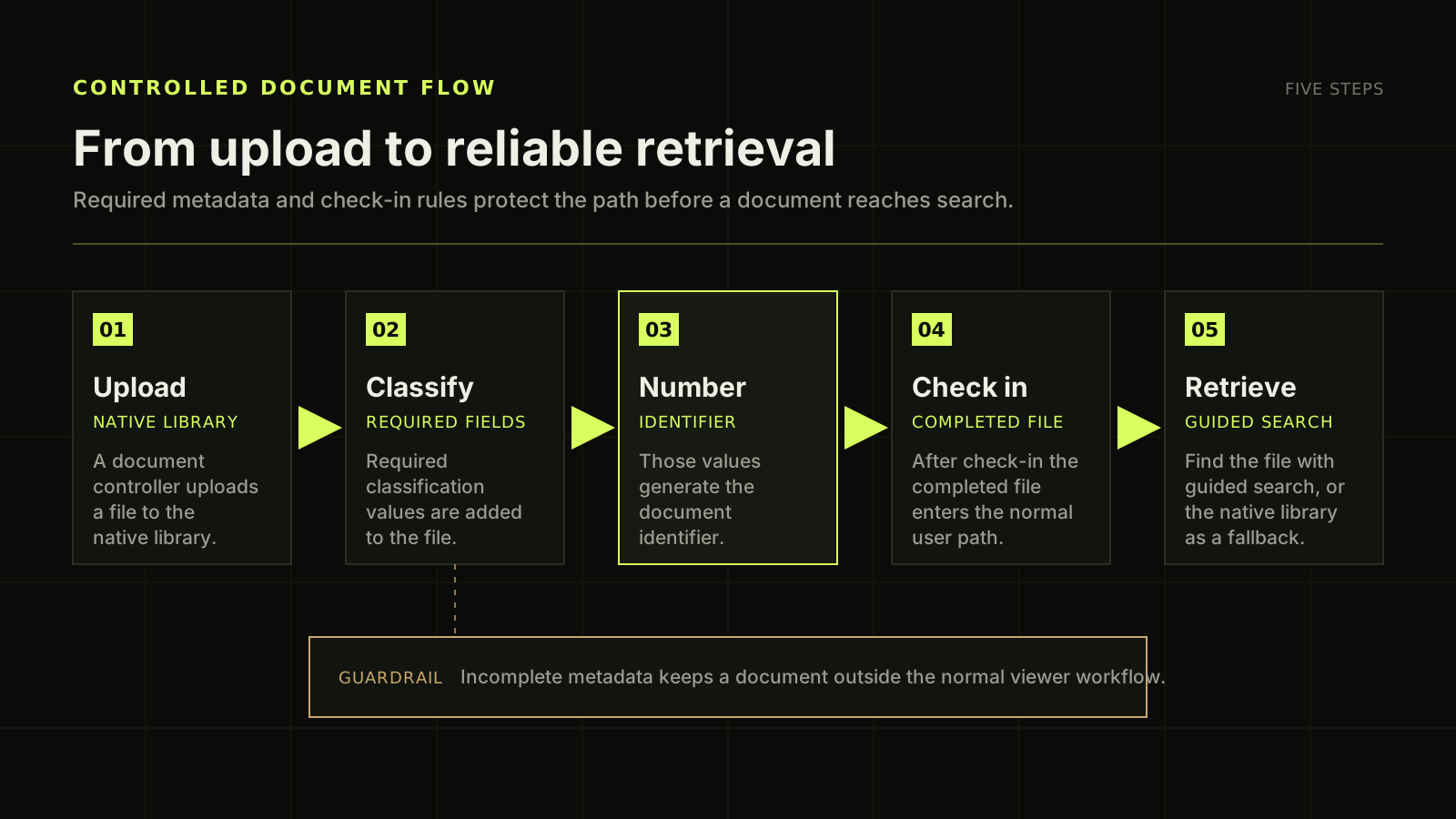
Major and minor version history, required check-out and required metadata were configured, along with a custom no-delete permission level for document controllers.
Open the flow description
The diagram shows a controlled document workflow as five numbered steps laid out in a row that reads from left to right on a near black background. Step one, upload: a document controller uploads a file to the native library. Step two, classify: the required classification values are added to the file. Step three, number: those values generate the document identifier. This third step is drawn with a brighter panel and a green border, because it is the point where the identifier is created. Step four, check in: after check-in the completed file enters the normal user path. Step five, retrieve: a person finds the file with guided search, or through the native library as a fallback. Green arrows join each step to the next one in order, and each step carries a small green tag naming what it produces. Below the row of steps sits a separate wide panel outlined in warm gold, labelled guardrail, which states that incomplete metadata keeps a document outside the normal viewer workflow. A dotted vertical line drops from the classification step down to that guardrail panel, because classification is where the metadata is entered.
What was delivered
Six things, and one of them is a permission level that did not exist.
- 01 Structured metadata generates each document number DELIVERED
- 02 Dependent filters, free-text search, sortable results table DELIVERED
- 03 Role-based access: viewers, document controllers, site owners DELIVERED
- 04 A custom no-delete permission level for controlled documents DELIVERED
- 05 Major and minor versions, required check-out, required metadata DELIVERED
- 06 Delivery, recovery, administration and end-user documentation DELIVERED
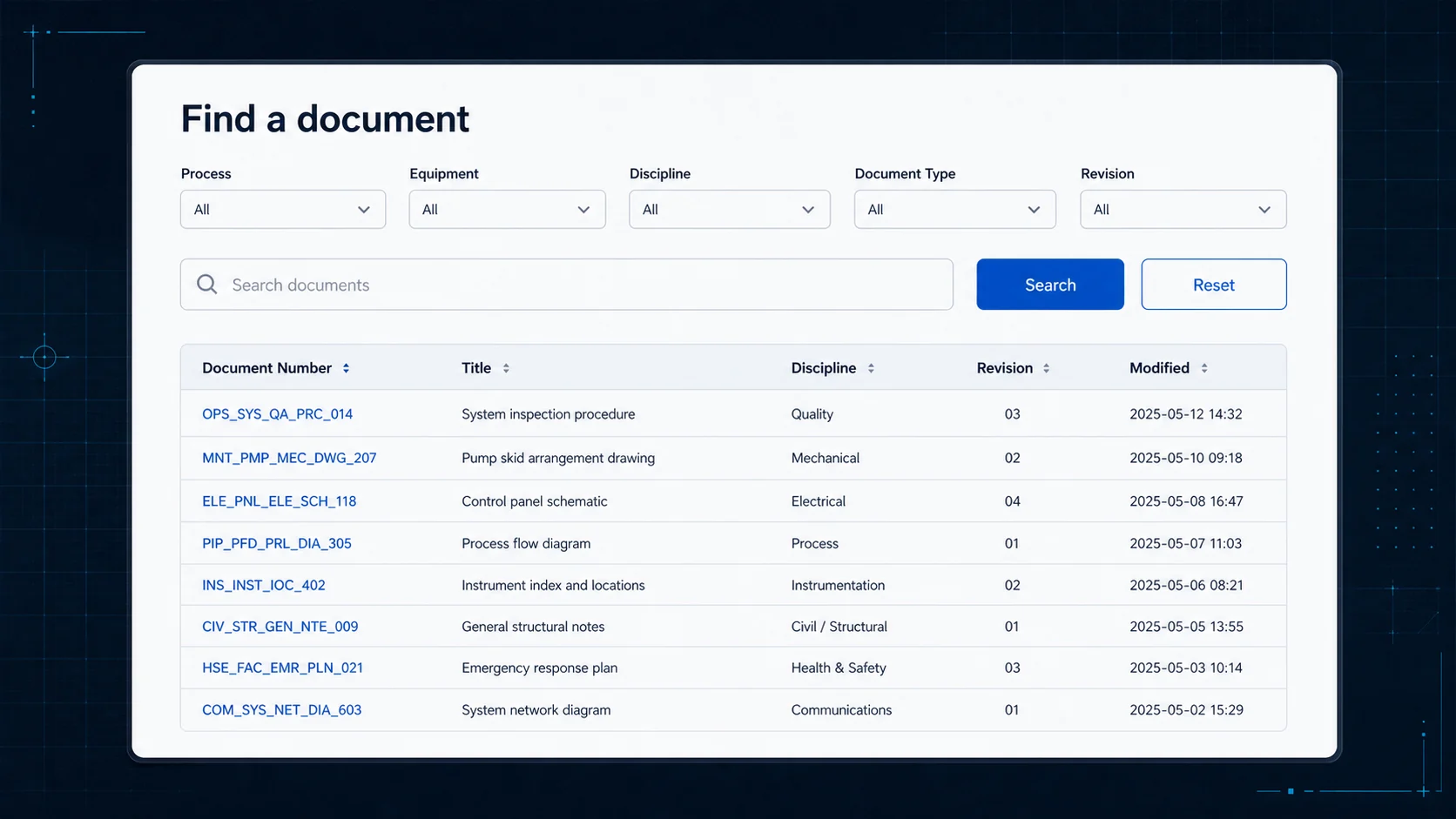
Interface recreated with synthetic data to protect client information.
My role
Discovery through documentation.
Discovery, solution architecture, SharePoint configuration, custom development, delivery coordination and documentation, working with client leadership and the project team.
Result
“A working document-management reference implementation in a real Microsoft 365 environment.”
Designed around structured retrieval, controlled access, maintainability, and a native fallback that means the custom layer is an improvement rather than a dependency.
Technology
What it is built on.
Related service: Digital Systems & Product Engineering
Before the custom layer
Need a document system that fits how your team actually works?
Tell me how documents are classified, controlled and found today. I will tell you what I would change first and what should stay native.
Tell Dan about it on WhatsApp (opens in a new tab)or email dan@burdetsky.xyz